

Brief Look on Apache HBase
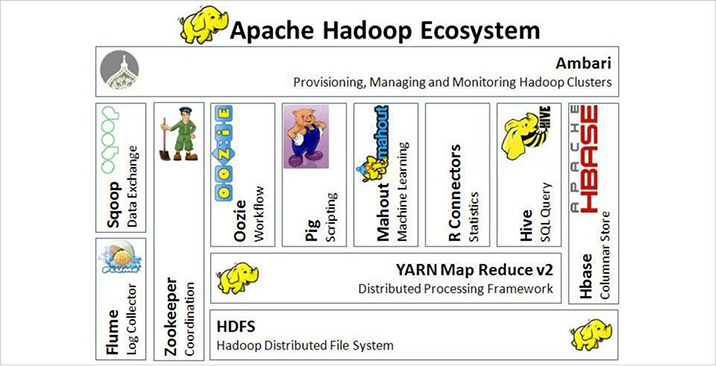
Like Google’s Bigtable and in hard competition to it, Apache HBase is an open-source, non-relational, scalable, and distributed database developed as part of Apache Software Foundation’s Apache Hadoop project. It operates on top of HDFS (Hadoop Distributed File System) in the architectural structure, which has Bigtable capabilities equivalent to Hadoop.

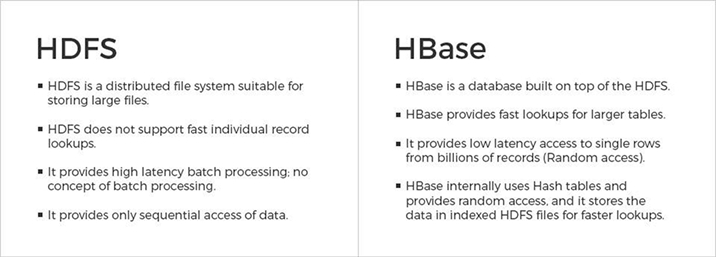
Hadoop can perform only batch processing, and data will be accessed only in a sequential manner. That means one has to search the entire dataset even for the simplest of jobs. Over others, purposes to use HBase are Data Volume (in petabytes data format), Application Types (variable schema with somewhat different rows), Hardware environment (running on top of HDFS with larger number of nodes (5 or more)), No requirement of RDMS (without features like transaction, triggers, complex query, complex joins, etc.) and Quick access to data (only if random and real-time access to data is required).In complex systems of BigData analysis, HBase and Hive – important Hadoop based technologies can be used in conjuction also, for further extended features to reduce the complexity.
Background
- Apache HBase is the current top level Apache project which was initiated by the company in the name of “Powerset”. The process was to process a large number of data and make it compatible to natural language search.
- Facebook even implemented its new messaging platform in Apache HBase.
- The 1.2.x series is considered to be stable release line. (as of February 2017)
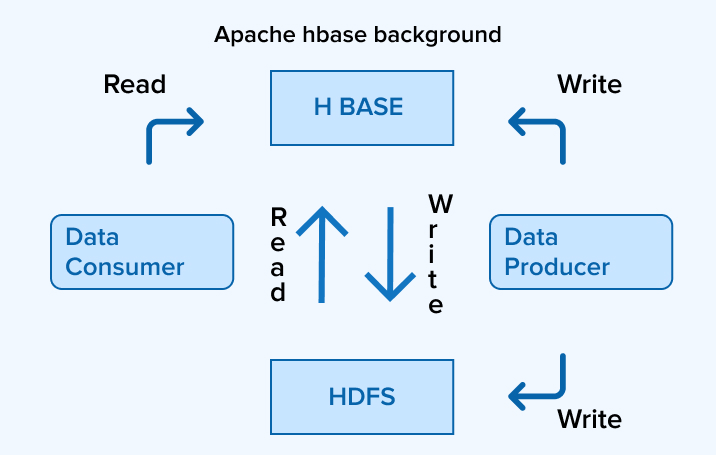
Data can be stored to HDFS either directly or via HBase. Data consumer reads or accesses the data in HDFS randomly with HBase. HBase stays on top of the Hadoop File System and provides both read and write access.
HBase vs HDFS
Storage Mechanism
HBase is a column-oriented database. The tables in HBase are sorted by row. The table schema represents only column families, which are commonly called the key-value pairs. A table has several column families and each column family possesses multiple columns. Succeeding column values are stored constantly on the disk. Furthermore, each cell value of the table has a timestamp.
- Table is a collection of rows
- Row is a collection of column families
- Column family is a collection of columns
- Column is a collection of key value pairs
Features:
- Linearly scalable
- Automatic Failure Support
- Consistent Read and Write facility
- Integrates with Hadoop, both as Source and Destination
- Caters easy Java API for client
- Data replication across clusters
Architecture:
In HBase, tables are divided into smaller regions and are assisted by the region servers. Each region is further vertically partitioned by column families into parts, commonly known as Stores. Each store is saved as a file in HDFS. Below diagram is the architecture of HBase:
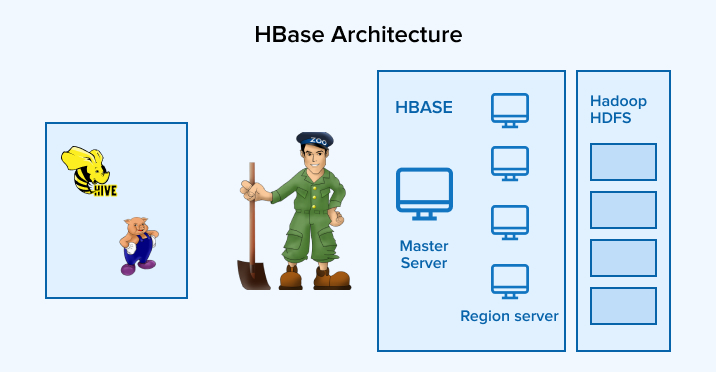
Note: The term ‘store’ is used for regions to explain the storage structure.
Setting Up Runtime Environment
Following are the pre-requisites for HBase –
- Create a separate Hadoop user (Recommended)
- Setup SSH
- Java
- Hadoop
- Configuring Hadoop
- core-site.xml – Adding host & port (HDFS URL), total memory allocation of file system, size of read/write buffer
- hdfs-site.xml – Should contain values of replication data, namenode path, datanode path, etc
- yarn-site.xml – Useful to configure yarn in Hadoop
- mapred-site.xml – Used to specify which MapReduce framework
- Installing HBase
We recommend to use HDP for learning purpose as it has all the pre-requisites already installed. We are using HDP v2.6 for demo purpose.
Java API
To communicate Java API is provided which apparently is the fastest way to deal with. All DLL operations are mainly facilitated by HBaseAdmin. Sample code to receive HBaseAdmin instance is mentioned below:
Configuration conf = HBaseConfiguration.create(); conf.set("hbase.zookeeper.quorum", "<server_ip>:2181"); conf.set("zookeeper.znode.parent", "/hbase-unsecure"); HBaseAdmin admin = new HBaseAdminconf);</server_ip> |

Niket Shah oversees technology projects at TatvaSoft, blending hands-on expertise with a passion for crafting innovative solutions. He thrives on turning complex challenges into impactful results.

Know more about custom software development services
Learn More About Custom Software Development
Want to Hire Skilled Developers?
Related Blogs

Ready to Build Your Custom Application Solution?
Ludych is a reputed CMMI level 3 software and mobile app development company. When it comes to software development companies, Ludych strives to be the best.
Request a Proposal


Comments
Leave a message...